
Welcome, Beta Testers!
Thank you for volunteering to help improve iodéOS! Before each official release, our team tests new versions to ensure everything works smoothly. Your feedback as a beta tester is invaluable in making iodéOS better for everyone.
Trying out the beta release channel is easy. Open the updater app and make sure you have the latest release of iodéOS. When the updater completes, reboot if necessary. From the updater app:
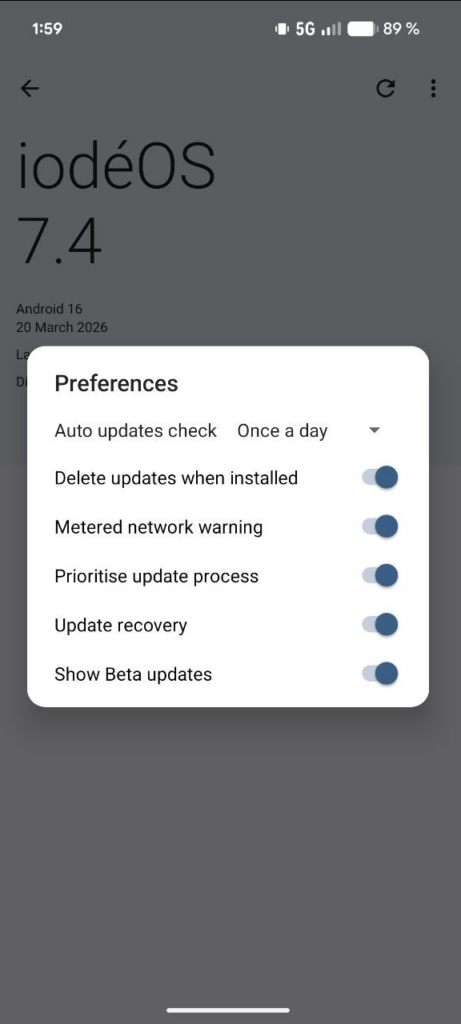
- Click on the three dots in the top right corner and choose preferences.
- Toggle the “Show Beta updates” switch.
- That’s it! Beta updates will now appear alongside stable releases.
How to Uninstall a Previous Updater
If you encounter issues installing a new updater, you may need to uninstall the previous version first (prior to march 2026, it was necessary to install a special apk file.)
- Open App Info by long-pressing the updater icon.
- Tap the three-dot menu in the top-right corner.
- Select Uninstall updates.
- Alternatively, use the command:
adb uninstall org.lineageos.updater
How to Provide Feedback
You’ll receive notifications when new beta updates are ready to install. If you encounter any issues, please report them through:
- Telegram Group – Join our community for quick support.
- Matrix Group (#iodeOS:matrix.org) – Connect with other testers and developers.
- Report your results to the community forum.
If everything works perfectly, just enjoy the early access to new features!